Down here in Spartanburg we are lucky to be able to observe a large variety of winged beasties. But North America itself is a very rich bird habitat - as the blooms come out, you'll hear the spring soundtrack of birdsong (and bird-shrieks!). With the help of my colleague Tim Brown I've assembled a few good resources for learning more about birds, their songs, their habitats, and their behavior.
But first things first:
"Ornithology" briefly (and variously) defined by Google's "define:" function.
The etymology (linguistic origin) of the word "ornithology," from the Online Etymology Dictionary.
Some juicer stuff:
The Cornell Lab of Ornithology, a great (free!) resource on the web from Cornell U., this site has some excellent features, most notably birdsong audio, pictures, videos(!) along with identification tips, maps indicating birds' ranges, and well, lots of good stuff. Prepare to get lost - in a good way - in this resource.
Scholarly resources (search our catalog for these titles):
The Cambridge Encyclopedia of Ornithology (hard copy only).
Journal of Ornithology (electronic journal).
The Wilson Journal of Ornithology (electronic journal).
The Journal of Caribbean Ornithology (electronic journal).
Journal of Avian Biology (electronic journal).
And there are several more. Search in our catalog for "ornithology."
Or maybe a book about the history of ornithology? Try searching our catalog for "A passion for birds : American ornithology after Audubon." Just a hint.
You may also want to search our catalog using terms like "birds," "bird watching," and so on. Use the links (just about any blue text, really) in the catalog to refine your searches. Go ahead and fiddle with the "facets" on the right side of the results page to find different types of resources - not to brag, but we've got lots.
But you ask: How about an 1893 illustration of the Red-Tailed Hawk in the Public Domain that I can download? Funny you should mention....
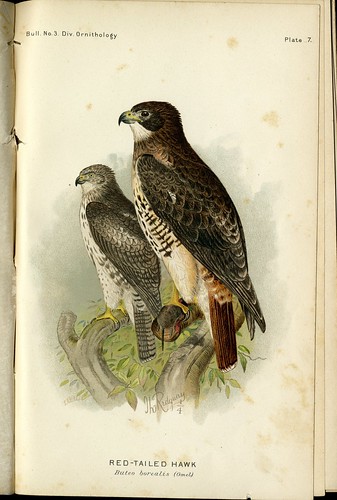
Or perhaps over 350,000 digital images of birds assembled by the masses? Done:
Chirp, chirp and gobble, gobble - thanks to Tim B. for helping with this post.
3.30.2010
One Third of Americans Use Library Computers
According to a study by the Gates Foundation and the U of W Information School, fully 1/3 of Americans use library computers. Other interesting findings:
Here is the report from the University of Washington Information School: US Impact Public Library Study.
- 1/4 of Americans use library computers while traveling
- People living below the poverty line have the highest rate of use of library computers (44%)
- The most common use for these computers is education
- Half of the teens surveyed had used the library in the past year
- 1/3 of teens surveyed use the library at least once a week
Here is the report from the University of Washington Information School: US Impact Public Library Study.
3.29.2010
Reeder 2.0: Finally, An Awesome iPhone Feed Reader Arrives
The newest version of Reeder 2.0 makes it the best feed reader available for the iPhone, according to MG Siegler at TechCrunch. You can find Reeder 2.0 in the App Store here. It’s $2.99.
Read more: Reeder 2.0
Labels:
Apple,
iphone apps,
mobile apps
Young Learners Need Librarians, Not Just Google (Forbes)
In this article in Forbes magazine, corporate lawyer Mark Moran chronicles his experiences with research and attributes his success to 'skilled trainers' [i.e. librarians]. He discusses studies done to determine how students benefit from librarian intervention in learning how to collect and evaluate information.
Read the web article here: Young learners need librarians, not just Google
Labels:
google,
information literacy,
librarians,
young learners
3.24.2010
"@" symbol added to MoMA's Dept. of Architecture and Design collection
"@" was an under-used almost vestigial character on typewriter keyboards until Ray Tomlinson - the guy that invented email - "chose the @ for his first e-mail because of its strong locative sense—an individual, identified by a username, is @ this institution/computer/server, and also because…it was already there, on the keyboard, and nobody ever used it."
As the curator notes, the acquisition of "@" "relies on the assumption that physical possession of an object as a requirement for an acquisition is no longer necessary, and therefore it sets curators free to tag the world and acknowledge things that “cannot be had”—because they are too big (buildings, Boeing 747’s, satellites), or because they are in the air and belong to everybody and to no one, like the @—as art objects befitting MoMA’s collection."
Read the full article, which includes a brief history of @.
As the curator notes, the acquisition of "@" "relies on the assumption that physical possession of an object as a requirement for an acquisition is no longer necessary, and therefore it sets curators free to tag the world and acknowledge things that “cannot be had”—because they are too big (buildings, Boeing 747’s, satellites), or because they are in the air and belong to everybody and to no one, like the @—as art objects befitting MoMA’s collection."Read the full article, which includes a brief history of @.
Labels:
design,
email,
technology,
web
3.23.2010
Yahoo Sketch-a-Search
Yahoo released a new iPhone app today, Sketch-a-Search. Here's a blurb from their blog:
"What do you do when you’re looking for a restaurant in a certain area or section of town, and you don’t know the name of the neighborhood, or even its ZIP code? Now with the Sketch-a-Search app, you can draw a circle around the general area on the map — around the San Francisco waterfront, let’s say — and voilĂ , restaurants appear. If you click on the restaurant results, you can read reviews, browse photos, check prices, and lots more. You can also refine your sketch search by types of cuisine, ambiance, or ratings to find a place that best matches what you are looking for. Today, you can find restaurants across the United States; we plan to launch additional local categories [hotels?] on an ongoing basis and extend to international markets in the near future."
Get the Yahoo Sketch-a-Search app
Read the Yahoo! Mobile Blog Post
"What do you do when you’re looking for a restaurant in a certain area or section of town, and you don’t know the name of the neighborhood, or even its ZIP code? Now with the Sketch-a-Search app, you can draw a circle around the general area on the map — around the San Francisco waterfront, let’s say — and voilĂ , restaurants appear. If you click on the restaurant results, you can read reviews, browse photos, check prices, and lots more. You can also refine your sketch search by types of cuisine, ambiance, or ratings to find a place that best matches what you are looking for. Today, you can find restaurants across the United States; we plan to launch additional local categories [hotels?] on an ongoing basis and extend to international markets in the near future."
Get the Yahoo Sketch-a-Search app
Read the Yahoo! Mobile Blog Post
Labels:
iphone apps,
mobile apps,
search engines
An Introduction to Augmented Reality
Here's a new video from Common Craft explaining augmented reality, "a new and growing way to use smartphones to learn about the world around you":
Augmented Reality Explained by Common Craft (~2 minutes)
Labels:
augmented reality,
web
Text 2.0: Does This Headline Know You’re Reading It?
A team at the German Research Center for Artificial Intelligence is working on a project called Text 2.0, a "reading enhancement technology." Here's a clip from h+:
"Ralf Biedert and colleagues at the German Research Center for Artificial Intelligence (DFKI) are using eye-trackers from Tobii Technology of Sweden along with HTML, CSS, and JavaScript to create a reading enhancement technology called Text 2.0.
This is not simply a case of using infrared light, a camera, and eye movement to move a cursor and click buttons: Text 2.0 infers user intentions and enhances the reading experience in far more complex ways. Reading certain words, phrases, or names can trigger the appearance of footnotes, translations, definitions, biographies, even sound effects or animations. Ask how a word is pronounced and you get a verbal answer. If you begin skimming the text, it fades out the less important words. If you glance away, a bookmark automatically appears, pointing to where you stopped reading."
Does This Headline Know You’re Reading It?
Text 2.0 Project Web Site
"Ralf Biedert and colleagues at the German Research Center for Artificial Intelligence (DFKI) are using eye-trackers from Tobii Technology of Sweden along with HTML, CSS, and JavaScript to create a reading enhancement technology called Text 2.0.
This is not simply a case of using infrared light, a camera, and eye movement to move a cursor and click buttons: Text 2.0 infers user intentions and enhances the reading experience in far more complex ways. Reading certain words, phrases, or names can trigger the appearance of footnotes, translations, definitions, biographies, even sound effects or animations. Ask how a word is pronounced and you get a verbal answer. If you begin skimming the text, it fades out the less important words. If you glance away, a bookmark automatically appears, pointing to where you stopped reading."
Does This Headline Know You’re Reading It?
Text 2.0 Project Web Site
Labels:
text 2.0
3.21.2010
Happy Birthday, Johann Sebastian Bach!
Johann Sebastian Bach was born on March 21, 1685 in Eisenach, Germany. To celebrate his birthday, you might enjoy listening to his pieces through our online music collections:
Bach in Classical Music Library (available on campus only)
Bach in Naxos Music Library (available on and off campus)
Bach in Classical Music Library (available on campus only)
Bach in Naxos Music Library (available on and off campus)
Labels:
online music collections
3.18.2010
How to: Export Records from the Library Catalog into Zotero
Great news for all of our Zotero users -- you can now export records from the library catalog into Zotero (see the detailed instructions below). If you experience any problems, have questions, or would like assistance with using Zotero, stop by the library, call 597-4302, or email askalibrarian@wofford.edu.
To add items to your Zotero library from the catalog, follow these steps:
1. Open the catalog in a Firefox browser (with Zotero installed).
2. Search the catalog and select the items that you would like to add to Zotero by clicking the checkbox underneath the icons in individual records:

3. Continue adding items as you revise and run new searches in the catalog. You will see that the catalog is keeping track of the items you have selected:

4. When you are ready to add the items to Zotero, select "Export to Zotero" in the "(select an action)" dropdown menu:

5. A window will pop up asking what you would like to do with the file. In the "Open with" dropdown menu, select Mozilla Firefox (skip to step 7). If you do not see Mozilla Firefox as an option, select "Other...'"

6. If you selected "Other...", a new window will appear asking you to select a program. Select "Firefox" and click OK. If you do not see Firefox, you will need to click the Browse button to locate Firefox on your computer (call 597-4302 or email askalibrarian@wofford.edu, if you need help).

7. You should now see "Firefox" in the "Open with" field. Click OK.

8. A new tab will open with a text file. In the address bar of Firefox you will see a file icon. Click on this icon to send the records into Zotero:

9. You will see the items from your list in the catalog being saved in Zotero:

10. When the "Saving Item..." window disappears, close the tab with the text file and you will be back on the library's catalog page:

11. If you are planning to continue searching and adding items to Zotero, clear the items you just added to Zotero from your list by clicking the "Clear" link:

12. Congratulations! You have added items from the catalog to your Zotero library.
If you experience any problems, have questions, or would like assistance with using Zotero, stop by the library, call 597-4302, or email askalibrarian@wofford.edu.
To add items to your Zotero library from the catalog, follow these steps:
1. Open the catalog in a Firefox browser (with Zotero installed).
2. Search the catalog and select the items that you would like to add to Zotero by clicking the checkbox underneath the icons in individual records:

3. Continue adding items as you revise and run new searches in the catalog. You will see that the catalog is keeping track of the items you have selected:

4. When you are ready to add the items to Zotero, select "Export to Zotero" in the "(select an action)" dropdown menu:

5. A window will pop up asking what you would like to do with the file. In the "Open with" dropdown menu, select Mozilla Firefox (skip to step 7). If you do not see Mozilla Firefox as an option, select "Other...'"

6. If you selected "Other...", a new window will appear asking you to select a program. Select "Firefox" and click OK. If you do not see Firefox, you will need to click the Browse button to locate Firefox on your computer (call 597-4302 or email askalibrarian@wofford.edu, if you need help).

7. You should now see "Firefox" in the "Open with" field. Click OK.

8. A new tab will open with a text file. In the address bar of Firefox you will see a file icon. Click on this icon to send the records into Zotero:
9. You will see the items from your list in the catalog being saved in Zotero:

10. When the "Saving Item..." window disappears, close the tab with the text file and you will be back on the library's catalog page:

11. If you are planning to continue searching and adding items to Zotero, clear the items you just added to Zotero from your list by clicking the "Clear" link:

12. Congratulations! You have added items from the catalog to your Zotero library.
If you experience any problems, have questions, or would like assistance with using Zotero, stop by the library, call 597-4302, or email askalibrarian@wofford.edu.
Labels:
library catalog,
zotero
Subscribe to:
Posts (Atom)


